EU Digital Fairness Act 2026 – Could Tiny Print and Hidden Fees Become a Legal Problem?
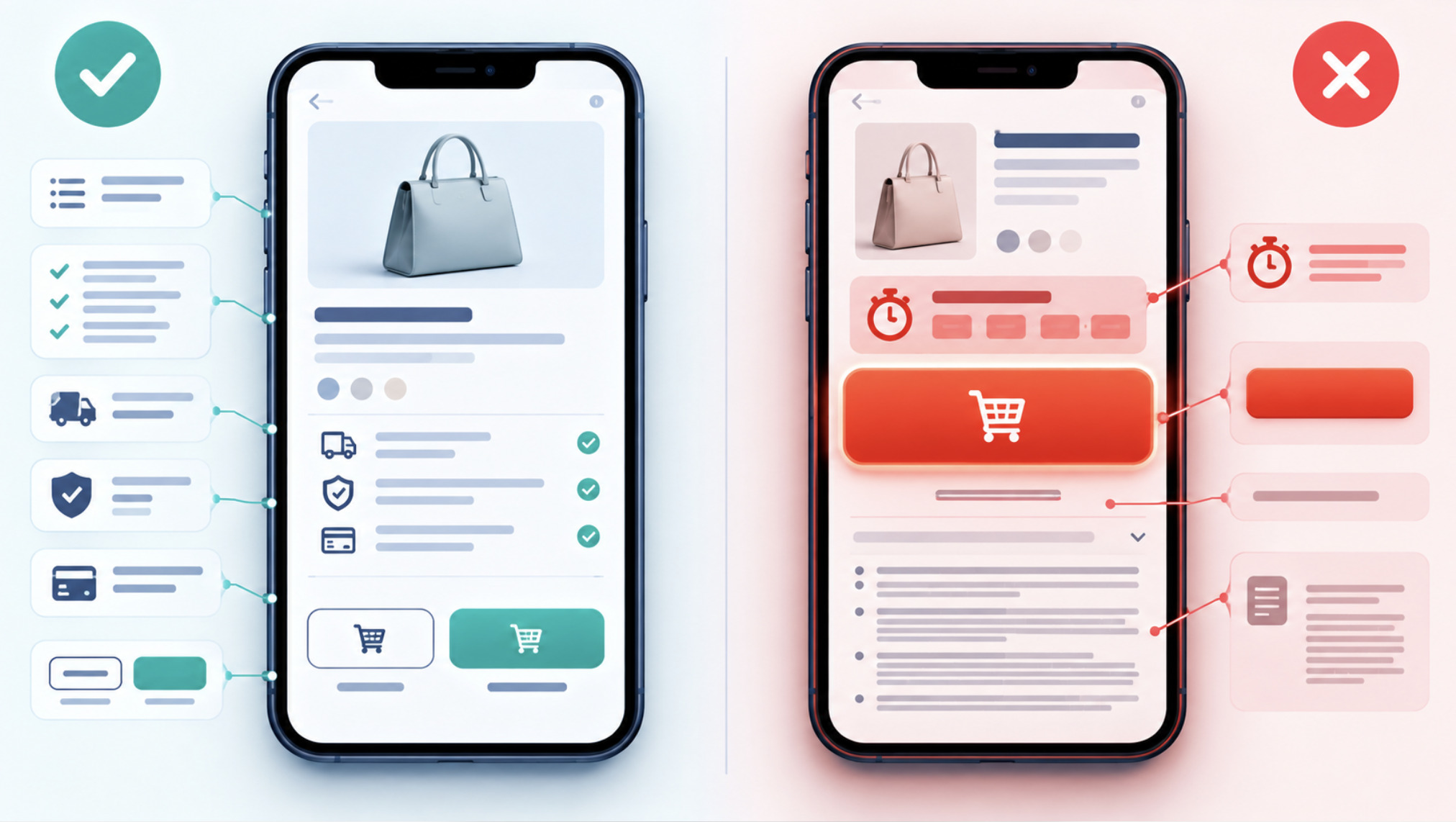
Small print is not illegal in the European Union, and no EU law sets a minimum font size for websites. The question regulators increasingly ask is a different one: whether the way information is presented lets consumers make an informed decision. Existing EU consumer law already prohibits misleading presentation, hidden costs and certain manipulative interface designs. The planned Digital Fairness Act could make those expectations more explicit for digital services. For designers, this shifts typography and layout from purely aesthetic choices toward questions of compliance.
The Digital Fairness Act does not yet exist as law. As of late October 2026, the European Commission has listed it in its 2026 work programme as a legislative initiative expected in the fourth quarter of the year. Parliamentary researchers and the European Economic and Social Committee have been examining the initiative. A proposal, once published, would still have to go through negotiations between the European Parliament and the Council before anything becomes binding.

Why the Initiative Exists
What the 2024 review found
In 2024 the Commission published a “fitness check” of three core consumer protection laws: the Unfair Commercial Practices Directive, the Consumer Rights Directive and the Unfair Contract Terms Directive. It concluded that the rules remain relevant but are only partly effective in the digital environment. The problems it highlighted included insufficient enforcement, legal uncertainty, fragmentation between member states and weak incentives for businesses to go beyond the legal minimum.
The review also documented recurring problems consumers face online: interfaces designed to steer choices, subscriptions that are easy to start and hard to cancel, personalised offers that exploit individual vulnerabilities, influencer marketing that is not clearly labelled, and designs that encourage compulsive use.
What dark patterns are
“Dark patterns” is the common term for interface designs that push users toward decisions they might not otherwise make. Examples include pre-selected options, confusing wording, a “cancel” button that is visually buried while “keep subscription” is highlighted, false urgency created by countdown timers, and costs that only appear at the end of a purchase process.
Addictive design and personalisation
The initiative also covers design that maximises engagement at the expense of the user’s interests, such as infinite scroll, variable rewards and autoplay, and personalisation that may target people based on inferred vulnerabilities. These issues go beyond typography, but they share a common thread: the way information and choices are visually arranged affects decisions.
The positions
Consumer organisations, including BEUC and national consumer centres, have called for clearer bans on manipulative design, stronger rules for digital subscriptions and a reversal of the burden of proof in some cases. More than 200 civil society organisations signed an open letter urging an ambitious proposal. Business organisations and several large platforms have argued that existing rules are largely sufficient. They warn that new obligations could duplicate the Digital Services Act and other legislation, and they call for better enforcement and simplification rather than new layers of regulation. The Commission has signalled that it also intends to simplify some information obligations for businesses.
What the Law Already Says
Designers sometimes assume that nothing applies until the Digital Fairness Act arrives. That is wrong. Several EU rules already govern how information is presented.
Current law
Unfair Commercial Practices Directive. It prohibits misleading actions and misleading omissions. Information that is “hidden” or presented in an “unclear, unintelligible, ambiguous or untimely manner” can count as a misleading omission. The directive also contains a list of practices that are always unfair, including false claims that an offer is only available for a very limited time.
Consumer Rights Directive. It requires key pre-contractual information to be provided clearly and prominently before an online order. It bans pre-ticked boxes for additional payments. It also requires the button that completes an order to make clear that the order involves an obligation to pay, for example by using wording such as “order with obligation to pay”.
Unfair Contract Terms Directive. Written terms must be drafted in plain and intelligible language.
Price Indication Directive and the 2019 Omnibus Directive. Announced price reductions must reference the lowest price applied in the prior 30 days. Total prices must include unavoidable charges, or explain how they are calculated.
Digital Services Act. Article 25 prohibits online platforms from designing, organising or operating their interfaces in a way that deceives, manipulates or otherwise materially distorts users’ ability to make free and informed decisions. The prohibition applies only where other rules, such as the Unfair Commercial Practices Directive, do not already cover the practice.
Distance marketing of financial services. For financial services contracts concluded online, revised rules applicable from June 2026 require a withdrawal function: a clearly labelled, easily accessible way to withdraw from the contract.
Proposed reforms and possible future requirements
What the Digital Fairness Act may add remains a matter of debate. Proposals discussed publicly include specific bans on certain dark patterns, easier cancellation of subscriptions, rules on automatic renewal reminders and free-trial conversions, limits on personalisation exploiting vulnerabilities, and clearer obligations for influencer marketing. None of this is law. Until the Commission publishes its proposal, any specific requirement remains speculation.
Typography Is Where Consent Becomes Visible
The law speaks of information being “clear”, “prominent” and “intelligible”. In a digital interface, those qualities are largely produced by design. A single fact, such as a price that renews at a higher rate after three months, can be made obvious or nearly invisible without changing a single word.
Font size and readability
A disclosure in 10-pixel grey text below a bright 32-pixel price is technically present. Whether a regulator or court would consider it “clear and prominent” depends on the context: the importance of the information, the size of everything around it and the device it appears on. There is no legal pixel threshold. Relative emphasis matters more than absolute size.
Contrast
Low-contrast text is one of the most common ways disclosures become effectively invisible. Light grey on white or thin type on coloured backgrounds may look elegant but can fail both accessibility standards and the “clear” test.
Visual hierarchy and density
Users scan rather than read. The eye follows headings, large numbers, colour and buttons. If the advantages of an offer dominate the hierarchy and its conditions sit in a dense paragraph further down, the layout effectively tells users what to ignore.
Mobile constraints
On a phone, the space above the fold is small. Disclosures moved into accordions, tooltips or a separate page may be technically accessible but unlikely to be seen. Good mobile typography puts critical conditions next to the action they affect.
Disclosure placement and button prominence
Information shown after a decision cannot inform it. If the final price, renewal terms or cancellation conditions appear only after the user taps “continue” or “pay”, the timing itself can be a problem. A bright “accept” button paired with a pale text link for “decline” is a familiar asymmetry, and one regulators explicitly discuss in the context of dark patterns.
Countdown timers and false urgency
A countdown timer is not inherently unlawful. A timer that resets on reload, or that implies an offer will expire when it will not, is a different matter: false claims of limited availability are already on the Unfair Commercial Practices Directive’s list of prohibited practices.
Poor Usability or Unfair Practice?
Not every bad design is illegal. A cluttered page, an unclear icon or a confusing form may simply be poor usability. The legal question becomes relevant when a design is likely to cause the average consumer to make a transactional decision they would not otherwise have made. Examples include signing up, paying more, not cancelling, or accepting conditions they did not understand.
The line depends on intent, effect and context, and is ultimately decided by consumer authorities and courts on the facts of each case. Designers do not need to answer the legal question themselves. They should, however, recognise when a design choice moves from “unclear” toward “steering”.
Three Hypothetical Interfaces
The following examples are fictional and do not describe any real company.
Example A: The subscription checkout
A streaming service shows “€4.99 per month” in large bold type. Beneath the payment button, in small grey text, a line explains that the introductory price applies for three months, after which the subscription renews automatically at €12.99, and that cancellation requires a notice period.
What is clear: the introductory price.
What is potentially misleading: the renewal price and conditions are material to the decision, but presented with much less emphasis and after the main call to action.
A clearer design: show both prices together with comparable emphasis (“€4.99 per month for 3 months, then €12.99 per month”), place the renewal and cancellation terms above the payment button, and send a reminder before the first full-price charge.
Example B: The mobile discount page
A mobile shop displays “-40%” in a red badge on a product page. Delivery fees, a mandatory service charge and a payment surcharge appear only on the last checkout screen.
The problem: the discount dominates the decision, while unavoidable costs are revealed late. EU rules already require the total price, including unavoidable charges, to be presented clearly. Discount claims must reference the prior lowest price.
A clearer design: show an estimated total, or at least a clear note of additional charges, on the product page. Display the reference price behind the discount, and let users see delivery costs before they enter their payment details.
Example C: The entertainment platform offer
An online entertainment platform advertises a promotional reward in large, colourful type on its landing page. The conditions attached to the promotion, such as time limits, eligibility or usage requirements, sit in a collapsed section in small low-contrast text.
The issue: the conditions determine the real value of the offer. When they are visually much less prominent than the headline, users may form an incomplete picture of what they are accepting. Where gambling or financial risk is involved, national regulators often impose additional requirements on how promotions and terms must be presented.
When reviewing any real platform in this sector, the useful test is practical rather than accusatory. A reader evaluating the terms on a Westio casino site page, or on any comparable entertainment service, can check four things. Are the key conditions placed next to the offer itself? Is the text large and contrasted enough to read on a phone? Is the language plain? Is everything visible before an account is created or a payment is made? Those questions apply equally to any operator and say nothing in advance about whether a given site meets them.
Present, Legible, Understandable and Timely
Four distinct questions are often merged into one. Each requires a different design response.
Information being present
The information exists somewhere on the website. This is the lowest bar, and legally it is rarely sufficient on its own.
Information being legible
The information can physically be read: sufficient size, contrast and spacing, and readable on mobile and when text is enlarged. This is primarily a typography and accessibility issue.
Information being understandable
The information can be understood by an average consumer: plain language, concrete numbers instead of vague references, no unexplained jargon, and no key conditions split across several pages.
Information presented before a decision
The information is shown at the moment it matters, before the user commits. A perfectly legible, perfectly worded disclosure that appears after payment does not support informed consent.
A design can pass the first test and fail the other three. Consumer law cares mostly about the last two, and accessibility standards mostly about the second.
Accessibility Guidance Is Not Consumer Law, but It Helps
The Web Content Accessibility Guidelines (WCAG), published by the W3C, are the most widely used technical standard for readable interfaces. They are not consumer protection law. In the EU, accessibility obligations come mainly from the Web Accessibility Directive for public sector bodies and the European Accessibility Act, which has applied to many e-commerce services since June 2025 and relies on harmonised standards closely aligned with WCAG. A design that meets WCAG is not automatically compliant with consumer law, and vice versa. In practice, the two overlap considerably.

Relevant WCAG success criteria
Contrast (1.4.3, level AA). Normal text needs a contrast ratio of at least 4.5:1 against its background. Large text, defined as at least 18 point or 14 point bold, needs at least 3:1.
Resize text (1.4.4, AA). Text must remain readable and functional when zoomed to 200% without assistive technology.
Reflow (1.4.10, AA). Content should reflow to a width of 320 CSS pixels without two-dimensional scrolling, which is essential for mobile disclosures.
Text spacing (1.4.12, AA). Content must remain readable when users increase line height, letter spacing and paragraph spacing.
Labels or instructions (3.3.2, A). Form fields need clear labels.
Error identification (3.3.1, A) and error suggestion (3.3.3, AA). Errors must be described in text and, where possible, explain how to fix them.
Target size (2.5.8, AA, WCAG 2.2). Interactive targets should be at least 24 by 24 CSS pixels, with some exceptions. This matters when a “cancel” link is a tiny tap target next to a large “continue” button.
Practical typography rules for disclosures
Use relative units (rem, em) so text scales with user settings.
Use fluid type sizes, for example with CSS clamp(), while keeping a sensible minimum for body and disclosure text.
Keep conditions in the same visual block as the offer they modify.
Give “decline” and “cancel” options a visual weight comparable to “accept”.
Express costs as concrete totals and dates, not percentages buried in conditions.
Test critical flows on a small phone screen with text enlarged.
What Designers Should Take From This
The Digital Fairness Act is still a proposal in preparation, and its final content is unknown. The direction of travel is nonetheless clear. EU law already treats the presentation of information as part of whether consumers were fairly informed, and policymakers are discussing how to address manipulative interfaces more explicitly.
For design teams, the safest approach does not depend on the final text. Make important conditions as visible as the offer itself, readable on any device, written in plain language and shown before the user decides. That is good usability, good accessibility and good preparation for whatever comes next.